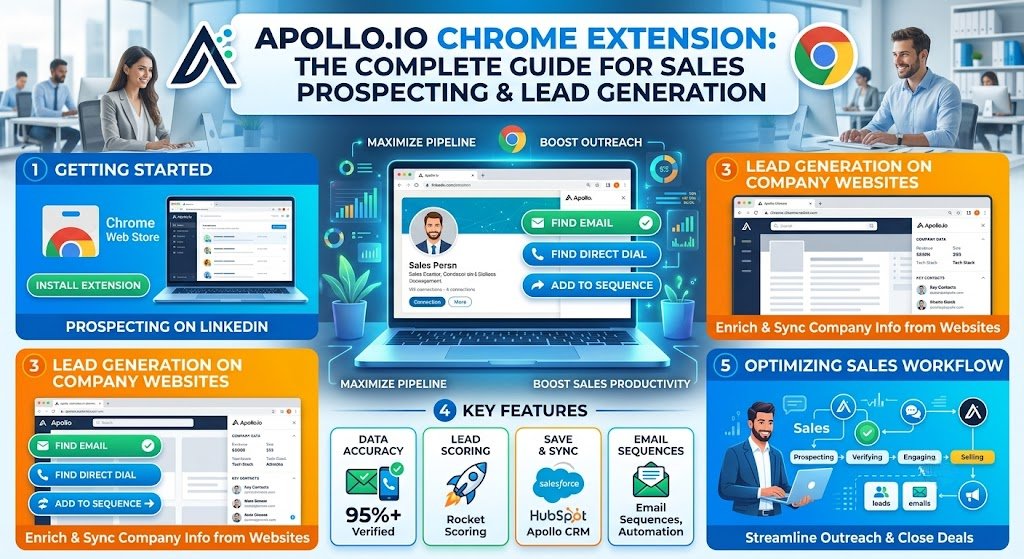
Finding qualified prospects has always been one of the most time-consuming parts of sales. Between researching companies, identifying decision-makers, locating verified email addresses, and updating CRM records, sales professionals can spend hours on tasks that don’t directly generate revenue.
This is where the Apollo.io Chrome Extension becomes a powerful productivity tool.
Instead of switching between multiple platforms, spreadsheets, and databases, the extension allows sales representatives, recruiters, founders, marketers, and business development teams to access prospect data directly from websites such as LinkedIn and company pages.
Whether you’re building outbound campaigns, expanding your professional network, or generating B2B leads, the Apollo.io Chrome Extension can significantly reduce manual research and improve prospecting efficiency.
In this comprehensive guide, you’ll learn:
- What the Apollo.io Chrome Extension is
- Key features and benefits
- How to install and use it
- Best practices for lead generation
- Pros and cons
- Common use cases
- Frequently asked questions
By the end, you’ll know exactly how to leverage Apollo’s extension to accelerate your sales workflow and improve prospecting results.
What Is the Apollo.io Chrome Extension?
The Apollo.io Chrome Extension is a browser-based sales intelligence tool that provides access to Apollo’s extensive B2B contact and company database directly within Google Chrome.
The extension enables users to:
- Find professional email addresses
- Discover phone numbers
- Access company information
- Identify decision-makers
- Save prospects to Apollo lists
- Export contacts to CRM systems
- Enrich lead data instantly
Instead of searching manually, users can view prospect information while browsing LinkedIn profiles, company websites, and other business-related pages.
This creates a seamless workflow that helps sales teams identify and engage prospects faster.
Why Professionals Use the Apollo.io Chrome Extension
Modern outbound sales depends heavily on speed and accuracy.
The extension helps users:
Save Research Time
Rather than manually collecting contact details from multiple sources, Apollo consolidates information into a single interface.
Improve Prospecting Efficiency
Sales representatives can identify qualified leads without leaving the browser.
Access Verified Contact Information
The extension provides professional contact data that can be used for outreach campaigns.
Build Targeted Lead Lists
Users can save prospects directly into Apollo sequences and workflows.
Increase Outreach Volume
Because research takes less time, teams can focus more on personalized communication and relationship building.
Key Features of the Apollo.io Chrome Extension
1. Email Finder
One of Apollo’s most popular capabilities is email discovery.
The extension helps users find:
- Work email addresses
- Business contact information
- Verified professional emails
- Alternative contact details
This eliminates the need for manual searching and increases prospecting efficiency.
Benefits
- Faster outreach
- Improved lead quality
- Reduced bounce rates
- Better campaign performance
2. Contact Enrichment
Contact enrichment adds valuable information to existing prospect records.
The extension can provide:
- Job titles
- Company details
- Department information
- Industry classifications
- Company size
- Revenue estimates
This helps sales professionals personalize outreach messages more effectively.
3. LinkedIn Integration
The Apollo.io Chrome Extension is widely used alongside LinkedIn.
When viewing a LinkedIn profile, users can often access:
- Contact information
- Company data
- Professional details
- Prospect insights
This makes LinkedIn prospecting significantly faster and more productive.
Common LinkedIn Use Cases
- SDR prospecting
- Recruiting candidates
- Building lead lists
- Identifying decision-makers
- Account-based marketing
4. Company Intelligence
The extension provides detailed company information that helps qualify leads.
Examples include:
- Industry
- Employee count
- Growth indicators
- Location
- Technology stack insights
- Organizational structure
This information allows teams to prioritize high-value opportunities.
5. CRM Integration
Apollo integrates with popular CRM platforms, helping reduce manual data entry.
Benefits include:
- Automated record creation
- Contact synchronization
- Reduced duplication
- Improved data accuracy
Sales teams can maintain cleaner databases while saving time.
6. Lead List Building
Users can save prospects directly into Apollo lists.
This feature helps:
- Organize outreach campaigns
- Segment audiences
- Track prospect engagement
- Manage lead pipelines
For teams running outbound campaigns, this functionality can dramatically streamline workflows.
7. Prospecting on Company Websites
The extension doesn’t only work on LinkedIn.
Users can also identify potential contacts while browsing:
- Company websites
- Startup directories
- Industry databases
- Business listings
This expands prospecting opportunities beyond social networking platforms.
How to Install the Apollo.io Chrome Extension
Installing the extension takes only a few minutes.
Step 1: Open Chrome Web Store
Visit the Chrome Web Store and search for Apollo.io Chrome Extension.
Step 2: Add to Chrome
Click the installation button and grant required permissions.
Step 3: Sign In
Log in using your Apollo account credentials.
Step 4: Pin the Extension
Pin the extension to your Chrome toolbar for easy access.
Step 5: Start Prospecting
Visit LinkedIn or company websites and begin using Apollo’s features immediately.
How to Use Apollo.io Chrome Extension Effectively
Find Decision-Makers
When researching companies, focus on people who influence purchasing decisions.
Examples include:
- Founders
- CEOs
- Directors
- VPs
- Department heads
This improves conversion rates because you’re targeting relevant stakeholders.
Build Highly Targeted Lists
Avoid collecting large numbers of unqualified leads.
Instead, filter prospects by:
- Industry
- Company size
- Revenue
- Geography
- Job title
A smaller list of qualified prospects often outperforms a larger list of generic contacts.
Personalize Outreach
Use enriched data to customize messages.
Mention:
- Company achievements
- Recent growth
- Industry challenges
- Shared interests
Personalized outreach typically generates better response rates than generic templates.
Keep CRM Records Updated
Regularly sync prospect data to maintain accurate records.
Benefits include:
- Better reporting
- Improved forecasting
- Cleaner pipelines
- Enhanced collaboration
Best Use Cases for Apollo.io Chrome Extension
Sales Development Representatives (SDRs)
SDRs use Apollo to:
- Find prospects
- Gather contact information
- Build outreach lists
- Launch cold email campaigns
The extension significantly reduces prospect research time.
Recruiters
Recruiters can identify potential candidates and gather professional information directly from LinkedIn and company websites.
Benefits include:
- Faster sourcing
- Better candidate targeting
- Streamlined recruiting workflows
Startup Founders
Founders often handle sales themselves during early growth stages.
Apollo helps them:
- Generate leads
- Reach decision-makers
- Build partnerships
- Identify potential customers
Without hiring large sales teams.
Marketing Teams
Marketers use Apollo for:
- Account-based marketing
- Lead enrichment
- Audience research
- Campaign targeting
This improves overall campaign performance.
Business Development Professionals
Business development teams rely on Apollo to identify partnership opportunities and connect with key contacts.
Advantages of Using Apollo.io Chrome Extension
Massive Time Savings
Research tasks that previously took hours can often be completed in minutes.
Improved Lead Quality
Access to enriched prospect information enables better targeting.
Better Workflow Efficiency
The extension reduces the need to switch between multiple tools.
Enhanced Productivity
Sales teams can focus more on conversations and less on administrative work.
Scalable Prospecting
Apollo enables users to build larger prospect lists without dramatically increasing workload.
Potential Limitations
While Apollo offers substantial value, users should understand some limitations.
Data Accuracy Can Vary
No sales intelligence platform maintains perfect data accuracy.
Always verify critical information before large-scale outreach campaigns.
Learning Curve
New users may require time to understand:
- Filters
- Lead management
- Sequences
- CRM integrations
Fortunately, most users become comfortable after a few prospecting sessions.
Credit-Based Usage
Many features rely on credits.
Heavy prospecting users should monitor consumption carefully to avoid exhausting their monthly allowances.
Apollo.io Chrome Extension Best Practices
Focus on Ideal Customer Profiles
Define your ICP before collecting leads.
Consider:
- Industry
- Company size
- Budget
- Location
- Business challenges
Targeted prospecting consistently delivers better results.
Verify Before Large Campaigns
Before launching mass outreach:
- Check contact details
- Validate segmentation
- Review messaging
- Confirm targeting criteria
This helps improve deliverability and engagement.
Personalize Every Email
Even small personalization efforts can increase reply rates.
Reference:
- Company news
- Job role
- Industry trends
- Recent achievements
Use Lists Strategically
Create separate prospect lists for:
- Enterprise leads
- SMB prospects
- Existing customers
- Partner opportunities
- Recruiting candidates
Proper segmentation improves campaign performance.
Apollo.io Chrome Extension vs Manual Prospecting
| Feature | Apollo Extension | Manual Research |
| Lead Discovery | Fast | Slow |
| Contact Information | Automated | Manual |
| Data Enrichment | Instant | Time-Consuming |
| CRM Sync | Available | Manual |
| Scalability | High | Limited |
| Productivity | High | Moderate |
For most B2B teams, using Apollo dramatically improves efficiency compared to traditional prospecting methods.
Who Should Use the Apollo.io Chrome Extension?
The extension is ideal for:
- Sales professionals
- SDRs
- BDRs
- Recruiters
- Startup founders
- Marketing teams
- Agencies
- Consultants
- Business development managers
Anyone responsible for finding professional contacts can benefit from Apollo’s capabilities.
Conclusion
The Apollo.io Chrome Extension has become one of the most valuable tools for modern sales prospecting, lead generation, recruiting, and business development. By bringing contact discovery, company intelligence, lead enrichment, and workflow automation directly into the browser, it eliminates much of the manual effort traditionally associated with prospect research.
Whether you’re an SDR building outbound lists, a recruiter sourcing candidates, a founder driving early-stage sales, or a marketer running account-based campaigns, Apollo can help you work faster and smarter.
The biggest advantage isn’t simply finding more leads—it’s finding the right leads with less effort. When combined with thoughtful targeting, personalized outreach, and a well-defined sales process, the Apollo.io Chrome Extension can become a powerful asset for increasing productivity, improving pipeline quality, and accelerating business growth.
Frequently Asked Questions (FAQ)
What is the Apollo.io Chrome Extension used for?
The Apollo.io Chrome Extension is primarily used for lead generation, prospect research, email discovery, contact enrichment, and sales prospecting directly from the browser.
Is the Apollo.io Chrome Extension free?
Apollo offers free and paid plans. Feature availability and usage limits depend on the subscription tier selected.
Does Apollo work with LinkedIn?
Yes. One of the most popular use cases is using Apollo alongside LinkedIn to discover prospects and access additional contact information.
Can recruiters use Apollo.io?
Absolutely. Recruiters often use Apollo to identify candidates, gather professional information, and streamline sourcing activities.
Is Apollo.io good for startups?
Yes. Startups frequently use Apollo because it combines prospecting, lead generation, and contact discovery in a single platform, making it cost-effective for growing teams.
Does Apollo integrate with CRM systems?
Yes. Apollo supports integrations with popular CRM platforms, helping teams manage leads more efficiently.
Is Apollo accurate?
Apollo generally provides useful prospecting data, but users should always verify critical contact information before large-scale outreach efforts.
Can I use Apollo for account-based marketing?
Yes. Many marketing and sales teams use Apollo for account-based marketing initiatives by identifying target accounts and decision-makers.