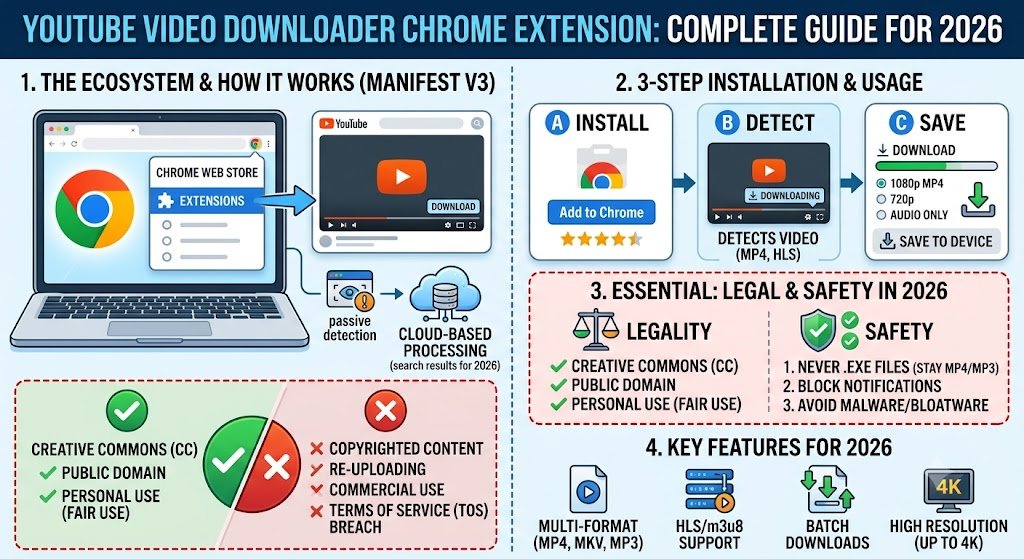
YouTube has become the world’s largest video platform, hosting everything from tutorials and educational content to entertainment, podcasts, and business training. As a result, many users search for a YouTube video downloader Chrome extension to save videos for offline viewing, backup educational content, or watch videos without an internet connection.
However, finding a reliable Chrome extension for downloading YouTube videos is not as simple as it once was. Browser policies, platform restrictions, and security concerns have significantly changed the landscape.
In this comprehensive guide, you’ll learn:
- What a YouTube video downloader Chrome extension is
- Why most extensions are no longer available in the Chrome Web Store
- The best downloader extensions and tools in 2026
- Safety and privacy considerations
- Legal aspects of downloading YouTube content
- Alternatives that actually work
- Frequently asked questions
By the end of this article, you’ll know exactly which solutions are worth considering and which ones to avoid.
What Is a YouTube Video Downloader Chrome Extension?
A YouTube video downloader Chrome extension is a browser add-on that allows users to save YouTube videos directly from their browser.
These extensions typically add:
- Download buttons below videos
- Video quality selection options
- Audio extraction features
- One-click downloading functionality
- Format conversion tools
The primary goal is convenience. Instead of copying URLs into a separate downloader website, users can download videos directly while browsing YouTube.
Why Are YouTube Download Extensions Hard to Find in Chrome?
One of the biggest surprises for users is that many YouTube downloader extensions have disappeared from the Chrome Web Store.
This happens because Google’s policies generally prohibit extensions that download videos from YouTube directly.
As a result:
- Many extensions are removed regularly.
- Developers distribute extensions through external websites.
- Some tools only support non-YouTube websites.
- New extensions frequently appear and disappear.
This is why searching for a YouTube downloader extension often leads users to third-party installation methods rather than official Chrome Web Store listings.
Key Features to Look for in a YouTube Video Downloader Chrome Extension
Not all downloaders offer the same experience.
When evaluating an extension, look for these features:
1. Multiple Video Resolutions
A quality downloader should support:
- 360p
- 480p
- 720p HD
- 1080p Full HD
- 4K (if available)
Higher resolution options provide better viewing experiences, especially on large displays.
2. Audio Download Capability
Many users only need audio.
Useful extensions offer:
- MP3 conversion
- Audio-only downloads
- Podcast extraction
- Music saving functionality
3. Fast Download Speeds
Performance matters.
The best tools:
- Download quickly
- Support large files
- Avoid throttling
- Handle long videos efficiently
4. Batch Downloading
Power users often need multiple files.
Batch downloading allows:
- Playlist downloads
- Multiple video downloads
- Course content archiving
- Faster workflow management
5. User-Friendly Interface
A clean interface improves usability.
Look for:
- Clear download buttons
- Simple settings
- Minimal advertisements
- Easy installation process
Best YouTube Video Downloader Chrome Extensions in 2026
Although availability changes frequently, these downloader solutions remain among the most recognized options.
Video DownloadHelper
Video DownloadHelper is one of the most popular video downloading extensions available.
Advantages
- Supports multiple websites
- Easy-to-use interface
- Multiple format options
- Frequent updates
Limitations
- Some features require companion software
- YouTube support may vary based on browser policies
Addoncrop YouTube Downloader
Addoncrop remains a well-known downloader for users specifically focused on YouTube.
Features
- One-click downloads
- MP3 conversion
- Quality selection
- Subtitle downloading
Considerations
Since it is often distributed outside the Chrome Web Store, users should verify downloads carefully.
Local YouTube Downloader
Local YouTube Downloader is a lightweight option that integrates directly into the YouTube interface.
Benefits
- Simple setup
- Lightweight performance
- Multiple quality options
- Minimal resource usage
Drawbacks
Updates may be less frequent than larger downloader projects.
Easy Video Downloader
This type of downloader focuses on simplicity.
Users appreciate:
- Beginner-friendly design
- Fast downloads
- Minimal configuration
However, functionality can vary depending on browser updates.
Are YouTube Downloader Extensions Safe?
Safety should be your top priority.
Many users focus only on download functionality and overlook security risks.
Potential Risks
Some extensions may contain:
- Malware
- Adware
- Tracking scripts
- Browser hijackers
- Excessive permissions
These risks are especially common among unofficial extensions.
How to Stay Safe
Follow these best practices:
Check Permissions
Review permissions before installation.
Be cautious if an extension requests access to:
- All website data
- Browsing history
- Downloads management
- Personal information
Read User Reviews
Look for:
- Consistent positive feedback
- Recent reviews
- Active developer responses
Avoid tools with large numbers of complaints.
Download From Trusted Sources
Only install extensions from:
- Official developer websites
- Reputable software directories
- Verified browser stores
Avoid suspicious download portals.
Keep Extensions Updated
Updates often include:
- Security patches
- Bug fixes
- Compatibility improvements
Outdated extensions can create vulnerabilities.
Can You Download YouTube Videos Legally?
This is one of the most common questions users ask.
General Rule
Downloading videos from YouTube may violate YouTube’s Terms of Service unless:
- The platform explicitly provides a download option.
- The creator permits downloading.
- You have obtained permission from the copyright owner.
Acceptable Use Cases
In some situations, downloading may be permitted:
- Your own uploaded videos
- Public domain content
- Creative Commons licensed videos
- Videos with explicit download permissions
Premium Downloads
Many users choose official offline viewing options available through YouTube’s own services when supported in their region.
Always respect copyright laws and content creator rights.
Why Many Users Prefer Alternatives to Chrome Extensions
Browser extensions are convenient, but they are not always the most reliable solution.
Many users now prefer dedicated alternatives because they often offer:
- Better stability
- More download options
- Faster performance
- Improved security
Let’s explore some alternatives.
Best Alternatives to YouTube Video Downloader Chrome Extensions
Desktop Download Software
Dedicated software often provides:
- Higher download speeds
- Better format support
- Playlist downloading
- Large file handling
These tools generally offer more features than browser extensions.
Online Video Downloaders
Online tools require no installation.
Advantages include:
- Browser-based access
- No extension installation
- Cross-platform compatibility
- Quick downloads
However, users should be cautious about intrusive ads and misleading download buttons.
Screen Recording Software
For educational or personal use cases, screen recording can sometimes be a practical alternative.
Benefits include:
- Capturing presentations
- Recording webinars
- Saving training sessions
- Preserving visual demonstrations
Popular screen recorders often include editing features as well.
How to Choose the Right Downloader
The best solution depends on your needs.
For Casual Users
Choose a lightweight extension with:
- Easy installation
- Basic download options
- Minimal configuration
For Students
Look for tools that support:
- Offline lectures
- Subtitle downloads
- Multiple resolutions
- Batch downloading
For Professionals
Prioritize:
- Reliability
- Security
- Large file support
- Playlist management
For Content Creators
Consider solutions that offer:
- Video conversion
- Audio extraction
- Metadata preservation
- Workflow automation
Common Problems and How to Fix Them
Download Button Not Appearing
Possible causes:
- Browser update
- Extension conflict
- Outdated extension version
Try:
- Refreshing YouTube
- Reinstalling the extension
- Updating Chrome
Downloads Fail Repeatedly
Possible reasons:
- Server issues
- Extension incompatibility
- Browser restrictions
Solutions:
- Update the extension
- Clear browser cache
- Test another downloader
Poor Download Quality
If video quality is lower than expected:
- Check source quality
- Select higher resolution manually
- Update downloader settings
Extension Stops Working After Chrome Update
This is common.
Chrome updates sometimes break extension compatibility.
In such cases:
- Wait for developer updates
- Check official support channels
- Consider alternative download solutions
YouTube Video Downloader Chrome Extension: Best Practices
To ensure a smooth experience:
Do
- Use trusted tools
- Verify permissions
- Keep extensions updated
- Scan downloads with antivirus software
- Respect copyright laws
Don’t
- Install unknown extensions
- Disable browser security features
- Download copyrighted content without permission
- Ignore privacy policies
- Share suspicious extension files
Following these practices significantly reduces security risks.
Conclusion
Finding a reliable YouTube video downloader Chrome extension in 2026 requires more research than it did in the past. Browser policies, platform restrictions, and security concerns have reduced the number of trustworthy options available through official channels.
The best downloader solutions focus on three essentials: security, reliability, and ease of use. Whether you choose a browser extension, desktop application, or online downloader, always verify the source, review permissions carefully, and stay aware of copyright considerations.
For most users, the ideal solution balances convenience with safety. By understanding how downloader extensions work, their limitations, and the alternatives available, you can make an informed decision and enjoy offline access to your favorite content when appropriate.
Frequently Asked Questions
What is the best YouTube video downloader Chrome extension?
Popular options include Video DownloadHelper, Addoncrop YouTube Downloader, and Local YouTube Downloader. The best choice depends on your requirements, browser version, and desired features.
Why can’t I find a YouTube downloader extension in the Chrome Web Store?
Google restricts many extensions that directly download YouTube videos. As a result, such extensions are frequently removed or distributed through external sources.
Are YouTube downloader extensions free?
Many extensions offer free functionality. Some provide premium upgrades with advanced features such as batch downloading, format conversion, and higher download speeds.
Is it safe to install YouTube downloader extensions?
It can be safe if you choose reputable developers, verify permissions, read reviews, and download from trusted sources. Avoid unknown or suspicious extensions.
Can I download YouTube videos in 4K?
Some downloader tools support 4K downloads when the original video is available in that resolution.
Do downloader extensions work on all browsers?
Many downloader tools support Chrome, Edge, Firefox, and Chromium-based browsers, though features may vary.
Can I download YouTube playlists?
Certain advanced downloaders support entire playlists, making them useful for educational courses and large content collections.
Do I need software in addition to the extension?
Some extensions require companion applications to handle video processing, conversion, or higher-quality downloads.